


Skyward Mobile Access
3.04.58K Reviews
App Specs
- Version
- 3.1.0
- Updated On
- License
- Free
- Downloads
- 1,000,000+
- Developer
- Skyward, Inc.
- Categories
- Education
- Platform
- Android
Screenshots
 Analysis by AppCompare
Skyward Mobile Access is the kind of education app that can become useful without ever feeling exciting. I see it as a practical companion for people who already rely on a school using Skyward: students checking academic information, parents keeping an eye on school-related updates, and staff accessing the parts of their work made available through the platform. It is free, aimed at Everyone, and developed by Skyward, Inc., so the main question is not whether it offers entertainment or a broad learning library. The real question is whether it makes school information easier to reach when you are away from a desktop.
After spending time with it, my impression is fairly balanced. The app can reduce the small delays involved in opening a browser, finding the correct school portal, and signing in through a normal web page. That convenience matters on a busy morning or when a parent needs to check something quickly. At the same time, the experience depends heavily on how a school has configured Skyward and on the quality of the information being published there. It is not a replacement for a teacher, a school office, or a full learning-management system.
How Skyward Mobile Access Handles Everyday School Tasks
The app sits in the education category, but it is better understood as an access point than as a teaching tool. You are not opening it to follow video lessons, practice mathematics, read a digital textbook, or join a classroom discussion in the way you might with a dedicated learning platform. Its purpose is to bring relevant school information into a mobile setting, with the available experience shaped by the Skyward services connected to your school.
That distinction is important before downloading it. A student who wants a study planner, flashcards, tutoring, or assignment creation should look elsewhere. A parent who wants a central place to check school-related information may find it more useful, provided the school supports the relevant Skyward setup. Staff members may also benefit, although their available tools and screens can differ from those of students and parents.
I like this narrower focus because it keeps the app from pretending to be an entire school in your pocket. The trade-off is that the value can feel uneven. When the information you need is available, the app can save a few steps. When something is handled through another school system, email, or a teacher’s separate platform, Skyward Mobile Access cannot fill that gap.
The app has been available since late July of 2012, and its current version is 3.1.0. That long presence suggests a product built around an established school-information ecosystem rather than a new social or classroom trend. It supports devices running Android 7.0 or later, which is helpful for people using older phones, though the age of a supported operating system should not be confused with identical performance on every device.
What speed feels like in normal use
My speed expectations are modest and realistic. An app like this is primarily a doorway to school information, so the time it takes to show useful content can depend on the connection, the account, and the school’s own system. I would not judge it like a game that must maintain a high frame rate or like a note-taking app that works entirely offline. The important test is whether it gets me to the right school information with less friction than a mobile browser.
Worth Reading Before You Choose

EA SPORTS FC Mobile 26 Is a Bigger Football Game, but It Takes Time

Flipboard Shows What News Apps Must Do Beyond the Feed

Switching to Android Auto Means Rethinking Your Driving Routine

Google Calendar Makes a Crowded Week Easier to Manage

Ludo King Makes the Most of the Minutes Between Plans

Baby Panda World Brings Quick Play to Modern Phones, but Its Game Library Feels Busy
That is where the app makes the most sense. A dedicated mobile entry point can be more comfortable than repeatedly searching for a school portal in a browser. It also gives the experience a more direct place on the phone, which is useful for parents who check information at predictable moments rather than constantly. I would still avoid opening it for the first time while rushing out the door. Signing in, selecting the correct school connection, or dealing with an account issue can turn a quick check into a longer task.
There is also a difference between launching quickly and being useful quickly. An app may open immediately but still need a network response before the information is ready. For that reason, I would not assume that previously viewed school details will always be available without a connection. If I needed something important during travel, I would check it in advance rather than treating the app as an offline record.
The best speed advantage is reduced navigation, not guaranteed instant loading. That is a small but meaningful distinction. Skyward Mobile Access can streamline the route to school information, but it cannot control every part of the journey between your phone, your account, and the school’s connected services.
Heavy-use moments reveal the real trade-offs
The most demanding moments are likely to happen when many families are trying to check information around the same time, when a school has just updated records, or when a user is moving between several areas of the account in one session. I would be careful about promising consistently smooth performance in those situations because the app is connected to a larger school-information environment. The phone is only one part of the system.
For a parent, a realistic scenario might be checking school information while preparing a child for the day. You open the app to confirm what has been posted, glance through the relevant details, and close it again. In that situation, the app’s value comes from focused access. It does not need to replace a full computer session. If you are trying to investigate a complicated record, compare several pieces of information, or handle an issue that requires detailed communication, a larger screen and the school’s normal support channels may be more comfortable.
Students may use it in a similarly short-burst way. A quick check before leaving school can be convenient, but I would not build an entire study routine around it. The app is not designed to turn scattered school information into a complete personal workflow. I would pair it with a calendar, notes app, or dedicated learning tool if I needed reminders, revision plans, or long-form organization.
Staff use can be more demanding because professional accounts may involve more frequent checks and a wider range of information. Whether it feels efficient depends on the specific role and what the school has made available through Skyward. I would treat the mobile app as a useful extension for quick access, not automatically as a substitute for every desktop task.
Reliability depends on more than the app itself
Reliability is the area where expectations need the most care. The developer is Skyward, Inc., but the information a user sees is connected to an individual school’s setup and account practices. If a detail is missing, delayed, or presented differently from what you expected, the cause may not be the phone application alone. The school’s data flow and configuration matter just as much.
That does not make the app useless; it simply changes how I would use it. For routine checks, it can be convenient. For time-sensitive decisions, I would verify critical information through the school when accuracy matters. A mobile display is helpful, but it should not become the only place a parent or student looks when a deadline, schedule change, or account concern has serious consequences.
Recovery is another practical consideration. If the app does not show what you expect, I would first check the connection and confirm that I am using the correct school and account. Next, I would close and reopen the app rather than repeatedly tapping the same screen. If the issue concerns school records or access rather than the app opening itself, contacting the school or the appropriate Skyward administrator is likely to be more productive than reinstalling immediately.
That recovery path is worth remembering because school apps can create confusion when a user assumes every problem is a software fault. A missing update may reflect the way information was entered or released. A login issue may belong to the account. A slow screen may be temporary network congestion. Separating those possibilities helps avoid wasting time and prevents unnecessary changes to a working setup.
Device limits and the older-phone question
Skyward Mobile Access supports Android 7.0 and newer, which gives it a relatively broad device range. That is good news for families who do not replace phones frequently. Still, operating-system compatibility only tells me that the app can run within that software range; it does not promise the same responsiveness on every handset.
On an older phone, I would keep expectations practical. School-information apps are generally more forgiving than graphics-heavy games, but limited memory, an aging battery, or a crowded storage system can still make switching between screens feel less comfortable. If the app behaves poorly while other applications are also open, closing unused apps and restarting the phone may be a sensible first step.
I would also consider the screen size. A student may be comfortable checking a short piece of information on a small phone, while a parent reviewing several details could prefer a tablet or computer. The mobile format is strongest for quick checks and weaker for extended reading or comparison. That is not a defect unique to this app; it is a natural trade-off of carrying school access in a pocket-sized device.
Because the app is free, the decision is easier for families who already need access to a participating school system. There is no purchase barrier to testing it. The more important cost is attention: users may need to learn where their school places information and which tasks still belong on the web or through direct contact with staff.
Where it beats the usual alternatives
The usual alternative is a mobile browser. A browser can be more flexible, especially if your school uses several online services, but it may require more navigation and repeated sign-ins. Skyward Mobile Access is more focused, and that focus can make routine access feel less cumbersome. If Skyward is the main school-information system in your household, a dedicated app is a sensible option.
Another alternative is relying on email notifications. Email is useful for announcements, but it can scatter information across an inbox and make it harder to see the current state of a school record. The app offers a more direct place to check, although it should not be expected to replace every message a school sends.
Dedicated learning platforms are a different comparison. They are usually better for coursework, submissions, class discussions, and study materials. Skyward Mobile Access is better suited to the administrative and informational side of school life. Choosing between them is not really a contest; many students and parents may need both, because they solve different problems.
One non-obvious advantage is that the app can encourage a healthier checking habit. Instead of searching through old messages, I can use it as a deliberate checkpoint: open it when I need current school information, record anything important elsewhere, and close it. The limitation is that this works only if the school keeps the relevant information current and the user understands which system is responsible for each type of update.
Who should use it, and who should skip it
I would recommend trying it if you are a student, parent, or school staff member whose organization uses Skyward and you want a mobile route to school information. It is especially suitable for people who prefer quick checks on a phone and do not want to depend entirely on a browser. Families sharing responsibility for school routines may also appreciate having a direct access point rather than relying on one person to forward every update.
I would be more cautious if you are looking for a complete education app. It is not the right choice for language practice, exam preparation, digital textbooks, classroom collaboration, or a sophisticated homework planner. A student who needs those functions will likely be happier with dedicated tools, while still using Skyward Mobile Access for the school information it actually provides.
I would also skip making it the center of your routine if your school rarely uses the connected Skyward features or if your account is handled through another primary system. Installing an app simply because it belongs to the education category will not create value by itself. Its usefulness begins with the relationship between your school and Skyward.
My performance verdict after weighing convenience and friction
The overall rating sits at 3.0 from around nineteen thousand ratings, with roughly four thousand six hundred written reviews. That mixed reception fits my view: this is a practical app whose success depends on context. People who need the connected school access may find it genuinely helpful, while users expecting a polished, feature-rich learning environment may feel disappointed.
It has passed one million installs, which shows that it serves a substantial audience, but popularity does not remove the need to judge it against your school’s setup. The Everyone content rating makes it suitable in age terms for a broad school community, yet suitability also depends on whether the app exposes the information and tools your particular role requires.
My final performance judgment is that Skyward Mobile Access is best when used lightly and intentionally. I would install it for convenient school checks, keep a browser or computer available for more involved work, and avoid assuming that every important update will appear instantly. Its resource demands are likely to matter less than connection quality, account access, and the school’s own use of the platform. When something goes wrong, a calm check of the network, account, and school configuration is more useful than immediately blaming the phone.
For the right user, the app is a practical shortcut to school information rather than a complete digital classroom. That is both its strength and its boundary. I would recommend Skyward Mobile Access to families and staff already connected to Skyward who want a free mobile option for routine access. I would not recommend it as a standalone learning solution, and I would choose a browser or a dedicated education platform when the task involves detailed work, extended reading, or tools outside the school-information side of the experience.
Pros
- Quick access to school information from a mobile device.
- Supports communication between schools
- students
- and families.
- Useful for checking announcements
- calendars
- and updates on the go.
- Centralizes multiple school services in one app.
- Can reduce reliance on paper notices and separate communication channels.
Cons
- Features depend on the school’s Skyward configuration.
- Some information may load slowly with a weak internet connection.
- The interface can feel dated compared with newer education apps.
- Users may need separate login details for different school accounts.
- Push notifications may be inconsistent on some devices.
FAQs for Skyward Mobile Access
What is Skyward Mobile Access used for?
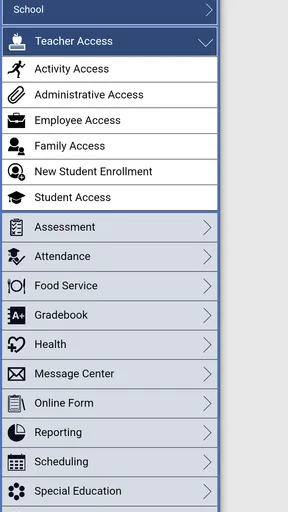
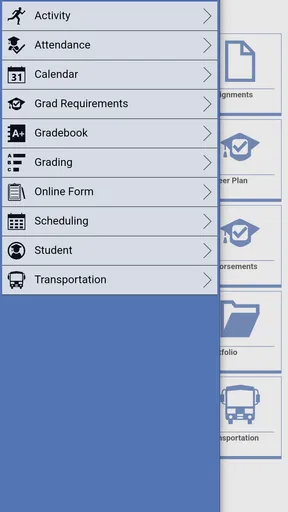
Skyward Mobile Access is a mobile companion app for schools and districts that use Skyward’s student information system. Depending on the institution’s setup, it can provide access to grades, attendance, assignments, schedules, messages, calendars, and other academic information. The exact features available are controlled by the school, so two users may see different tools or sections after signing in.
How do I log in to Skyward Mobile Access?
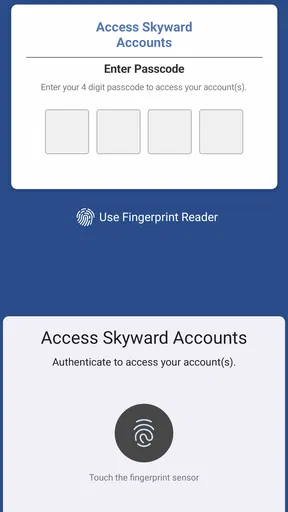
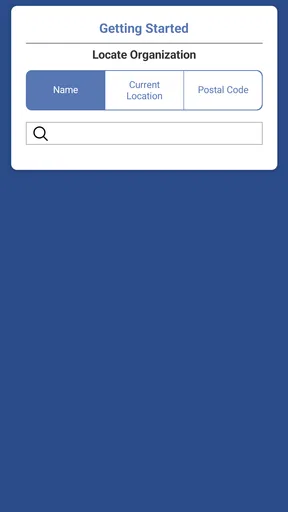
To use the app, you generally need an account provided by your school district, along with the correct login details and sometimes a district-specific connection or access code. Open the app, select the appropriate institution if prompted, and enter your credentials. If you cannot sign in, contact your school’s technology office or administrator rather than creating a separate account independently.
Is Skyward Mobile Access free to download and use?
The Skyward Mobile Access app is typically available to download without a separate purchase on supported Android and iOS devices. However, access to its services depends on whether your school or district uses Skyward and has enabled mobile access. Your institution may also apply its own policies, authentication requirements, or service limitations, so downloading the app alone does not guarantee access to every feature.
What information can parents and students view in the app?
The information displayed depends on the permissions assigned to your account and the Skyward modules used by your school. Students may be able to review grades, attendance, assignments, schedules, and school announcements, while parents may see information for one or more children. Some districts also enable messaging, fee details, meal information, or registration tools, but these options are not universal.
What should I do if grades, attendance, or notifications are not updating?
First, check your internet connection, refresh the relevant page, and make sure you are using the latest version of the app. Information may also be delayed if the school has not entered or published new data yet. If the problem continues, sign out and back in, then contact your school or district support team, since administrators control the records and features shown in Skyward Mobile Access.


